I have started exploring and learning how to make the eZ80 CPU module boot directly into an operating system such as CP/M (CP/M 2.2), without the need for ROMWBW or the 512K RAM/ROM module.
A build with the eZ80 CPU, the Linear 2MB RAM and the USB for RC is all the hardware that is needed to run an operating systems such as CP/M. A fully featured USB powered CP/M build with no need for a banked memory system!
With the eZ80’s Z80 compatibility mode, a 64K segment of the linear memory can be ‘allocated’ and CP/M loaded into that segment. A new custom bios (CBIOS) needs to be written to map the CP/M requests for disk and serial access. This custom bios can take full advantage of the eZ80 system.
To achieve a bootable CP/M system on the eZ80, the following needs to be completed:
I have been studying Wayne Warthen’s RomWBW code - specifically his CBIOS (custom bios) implementation, and also following “John’s Basement” Z80 Retro video series - specially from part 25 where he walks through his code to port CP/M. See his youtube video here: Z80 Retro #25- CP/M BIOS Boot & Console
I am progressing in the development of the new CBIOS, with access to the serial port and USB disk storage mostly done. I’ve manage to get the beginnings of a ‘CRT’ interface using the ‘HDMI for RC’ to produce a minimal ANSI compliant display. The screen capture below, show the system booting up from a USB flash drive:
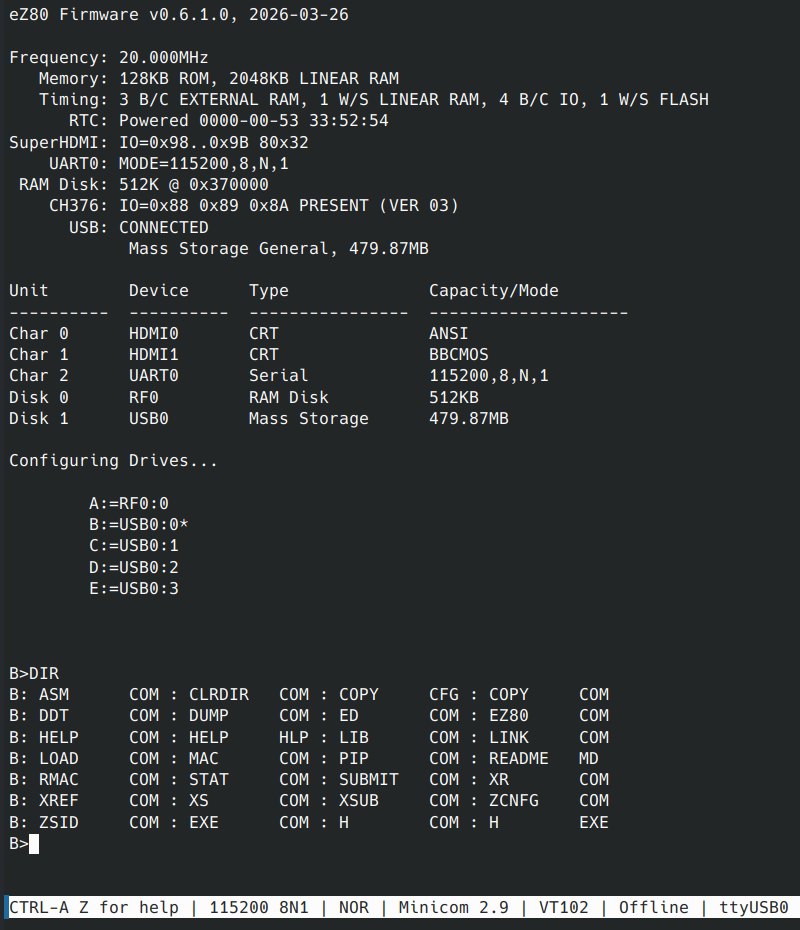
I’ve made it very much like RomWBW’s bootup report!
The CBIOS delegates to many services in the firmware and runs in the full 24bit ADL code level, giving it the maximum capability and performance. Still a lot more work to finish the implementation.
As currently implemented, the eZ80 firmware’s boot-up code, probes for the presence of the RomWBW system, and if detected, will boot as per the existing process. Otherwise it scans for an external USB storage device with a CP/M bootable ‘slice’, loads it into memory - then transitions to the CP/M startup code.
The disk images are laid out in the same way as RomWBW’s disk images - so the disks are mostly interchangeable.
From a user’s perspective, the system will boot up and present a CP/M console just as before - with just minor differences.
In theory, once I have completed the BIOS implementation, I will have a working CP/M system. And it should run most CP/M programs without issues - but there are a few limitations:
One possible way to work-around points 1 & 2, is to use the Z80 opcode interpreter previously implemented in the firmware. Perhaps a special loader tool can be created to ‘execute’ the incompatible program and manage the I/O and Z80 compatibility issues.
Point 3 will be relevant for programs written for RC2014/RCBus modules. Many will either attempt direct access to the module (point 1) or may use RomWBW HBIOS calls to access the hardware (Timers, Sound, Video, etc). So perhaps a HBIOS port can be implemented (at least a partial port) to help with this compatibility.
But those are for a future Dean to work on!
In the meantime, if you have the required hardware, you can try the new experimental releases - available at: https://codeberg.org/dinoboards/ez80-for-rc/releases
 Store
Store